🚀 .NET MAUI Performance Boost You’re Skipping 🚀

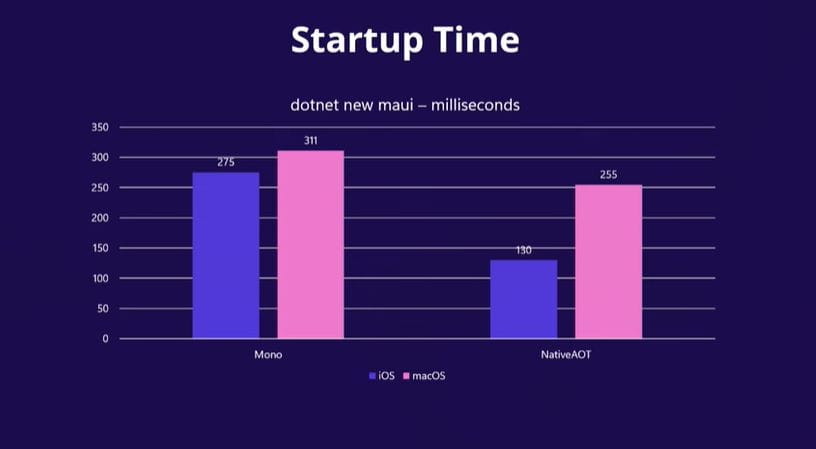
🚀 Faster launch
🔻 Smaller app size
If that’s what you want, invest in NativeAOT & Trimming.
Check the results.


🚀 Faster launch
🔻 Smaller app size
If that’s what you want, invest in NativeAOT & Trimming.
Check the results.

.NET MAUI performance test: CollectionView vs BindableLayout. Same data & UI. CollectionView stays smooth, while BindableLayout spikes CPU + memory and lags on navigation. 👉 Watch the meters in the video. Frame time tells the truth. 👉 Smooth delights users; lag becomes a negative App Store / Play Store review. ⚠️ Pick your UI components

I’ve read countless takes during my Xamarin → MAUI migrations about how Handlers are lighter and faster...plenty of claims, very few metrics. It felt like driving a car without a speedometer. So I took measurements. In this video, I compare a simple UI that fills the screen with Entry

Here’s the exact profiling flow I use in my projects (see video): ⭕ Publish a Release APK ⭕ Open Android Studio → File → Profile or Debug APK… and load that build. ⭕ Run it on a real device for more accurate results. ⭕ Use realistic, production-size data and real navigation flows. ⭕ Attach the Android
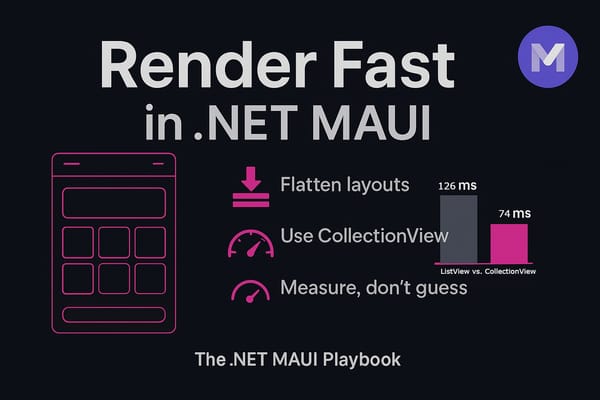
If performance feels bad, look at your layout first. Think like a renderer: every container is work. Reduce nesting, cut overdraw, keep the tree shallow, constrain sizes, and let virtualization do the heavy lifting ⚡ 🧩 Minimize layout complexity Flatten hierarchies; avoid stacks inside stacks Prefer a single well-planned Grid; constrain sizes